AltTabio Docs
How to install AltTabio, use it, change it, and remove it.
Getting started
AltTabio is a free, open-source window switcher. It replaces Alt+Tab on 64-bit Windows 10 and 11, and Cmd+Tab on macOS 26 and later. It keeps the shortcut you already know and shows you more once the switcher is open.
On Windows, Alt+Tab opens a list of your open windows beside a large live preview of the selected one. Start typing while you hold Alt and the list narrows by title, app, or number. Letting go of Alt switches.
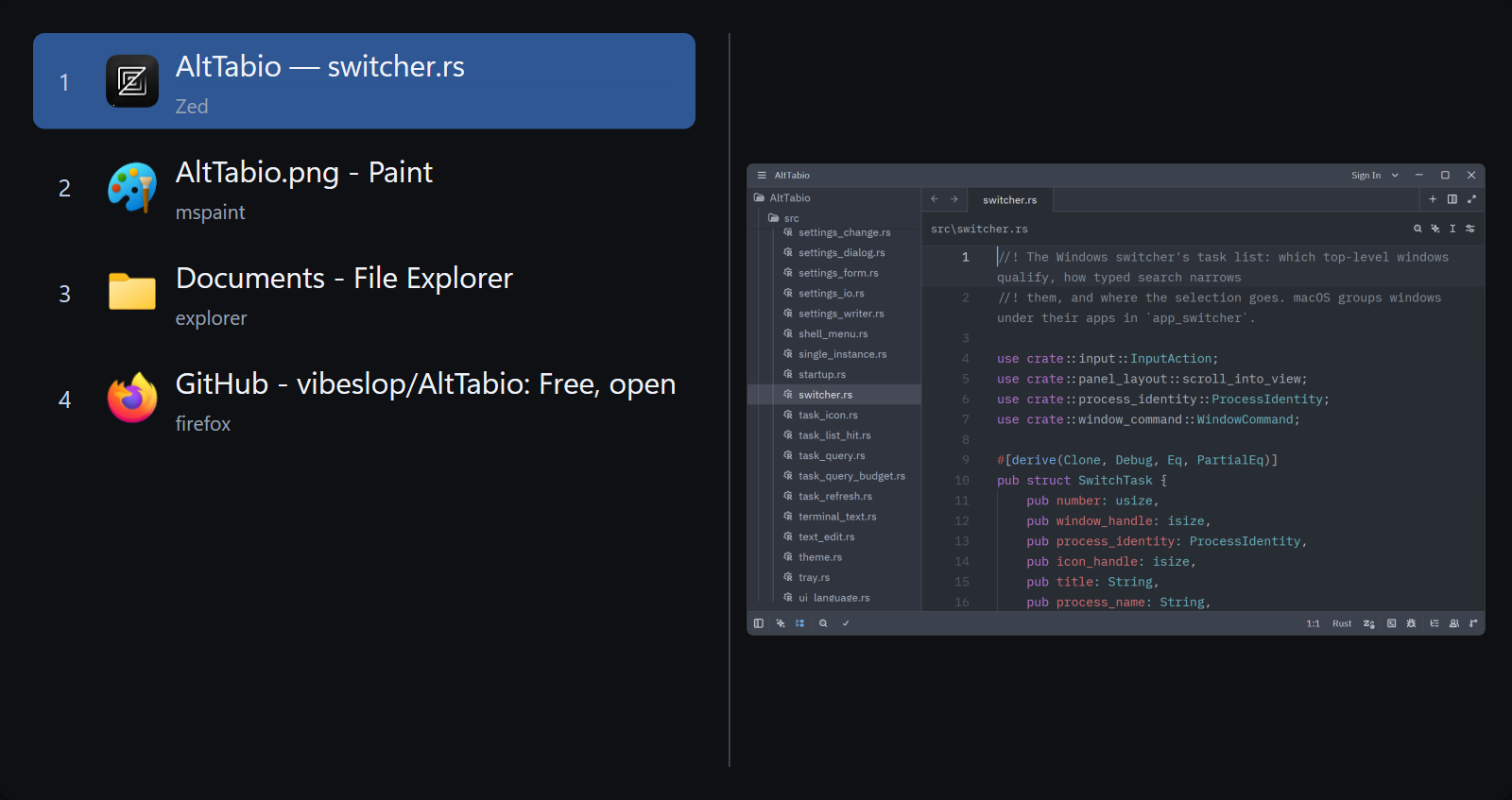
- Runs on
- 64-bit Windows 10 and 11, with several monitors and high-DPI displays
- Comes as
- One small program, installed with one line in PowerShell. No store account, no runtime.
On a Mac, Cmd+Tab opens a strip of your running apps, most recently used first, and lists every window of the selected app below it. Minimized windows, windows of hidden apps, and windows on other desktops are in the list, each marked. The first Tab lands on the previous app, and letting go of Cmd switches.
- Runs on
- macOS 26 or later, on Apple silicon and Intel
- Comes as
- A universal app, installed with one line in Terminal
- Next
- Install on Mac
Install on Windows
Paste one line into PowerShell. AltTabio updates itself after that.
Install with PowerShell Recommended
irm https://vibeslop.github.io/AltTabio/install.ps1 | iex
- Press Start, type PowerShell, and open it. Paste the line and press Enter.
- Windows asks whether PowerShell may make changes. Choose Yes. A second window finishes the install and opens AltTabio.
- Press Alt+Tab.
The script downloads the newest release and installs it only if it is signed with AltTabio’s pinned release key, the same check the app’s updater makes. It installs in C:\Program Files\AltTabio, a folder only administrators can change, and keeps your settings when it updates a copy there.
Why PowerShell? The certificate that stops Windows warning about an app costs its developer a yearly fee, and AltTabio doesn’t pay it, so Windows warns about a copy downloaded in a browser. The command checks that the download really is AltTabio’s, then installs it.
Download and verify by hand
- Get the Windows zip and its matching
.zip.minisigfrom the same GitHub release. - Follow Windows first-install verification. Build the verifier from separately trusted source, never from the downloaded archive, and verify the archive and signed release identity. Stop if the signature is missing or verification fails.
- After verification succeeds, unzip that archive into a folder only administrators can change, such as
C:\Program Files\AltTabio. - Open
AltTabio.exe, click Yes on the Windows prompt, and press Alt+Tab.
Windows asks for administrator permission because AltTabio needs it to see Alt+Tab before Windows does and to close a frozen program when you ask. More about the prompt.
Keep it in a safe folder
Start at sign-in creates a scheduled task that runs AltTabio with the highest privileges at every logon. If a program without administrator rights could replace AltTabio.exe, it could use that task to gain them.
So keep AltTabio in a folder only administrators can change, such as Program Files. Both autostart and the updater refuse an executable that non-elevated processes can replace.
Install on Mac
Paste one line into Terminal. AltTabio updates itself after that.
Install with Terminal Recommended
curl -fsSL https://vibeslop.github.io/AltTabio/install.sh | sh
- Open Terminal, paste the line, and press Return. It installs AltTabio in Applications, or updates your copy, then opens it.
- Allow Accessibility when AltTabio asks, then press Cmd+Tab.
- AltTabio updates itself from then on. To check now, choose Check for Updates… in its menu bar menu.
The script downloads the newest installer and runs it only if it is signed with AltTabio’s pinned release certificate. A new copy goes in /Applications if that folder is writable, otherwise in ~/Applications. An existing copy is updated where it is.
Why Terminal? Apple charges developers to notarize their apps, and AltTabio doesn’t pay, so macOS blocks a copy downloaded in a browser. The command checks that the download really is AltTabio’s, then installs it.
First run
AltTabio asks for Accessibility on first launch, keeps its settings window open until you allow it, and picks up the grant while it runs. After your first Cmd+Tab it asks for Screen Recording, which only window previews use. The list works without it. More about both permissions.
Download the app by hand
- Download
AltTabio-<version>-macos.zipfrom GitHub Releases and unzip it in Downloads. Leave the app there without opening it. In Terminal, run this command to verify the app’s signature, bundle identifier, and pinned release certificate. If you unzipped it elsewhere, change the quoted app path to that location.
codesign --verify --deep --strict -R '=identifier "com.vibeslop.AltTabio" and certificate leaf = H"617A82407E9767025EDE4A62A9B990ADEA21F53B"' "$HOME/Downloads/AltTabio.app" && printf '%s\n' 'Verified AltTabio release identity.'Continue only if Terminal prints Verified AltTabio release identity. If it does not, stop. Do not move or open the app, or use Open Anyway.
- Only after verification succeeds, move that same
AltTabio.appto Applications and open it. When macOS says it could not verify the app, choose Done. - For the verified app only, open System Settings, Privacy & Security, click Open Anyway next to the message about AltTabio, and confirm.
Open Anyway does not verify the release identity; the check in step 2 is required first. The Terminal installer checks the same identity before installing.
Shortcuts on Windows
Alt+Tab and Enter are all you need. The rest are there when a window misbehaves.
Letting go of Alt switches to the selected window. Once you start a search, the switcher stays open after you let go; press Enter or click a result to switch.
| Alt Tab | Open the switcher and move through it. Win+Tab can open it too. |
|---|---|
| ↑ ↓ Shift Tab | Change the selected window |
| Mouse wheel | Over the list, scroll it without changing the selection; elsewhere, select the previous or next window |
| Enter, click | Switch to the selected window |
| 1 to 9 | Switch to that window when the query is empty; otherwise type the digit. The number labels are hidden until you turn on Number shortcuts. |
| Type | Filter by window title, app name, or number |
| Backspace | Remove a filter character |
| ← → Home End | Edit an active query; otherwise navigate the windows |
| Ctrl + A C X V | Select, copy, cut, or paste query text |
| Ctrl + Z / Y | Undo or redo a query edit |
| Esc | Close the switcher. So does a click outside it. |
| F4 | Close the selected window |
| F5 F6 F7 | Minimize, maximize, restore |
| F8 | End the selected window’s program |
| F9 | Open another window of the same app, without administrator rights |
| Right-click | Window commands for that row |
Shortcuts on Mac
The keys follow macOS. Hold Cmd for all of them, as in the system switcher.
| ⌘ Tab | Open the switcher on the previous app. Tab steps on, Shift+Tab steps back. |
|---|---|
| ⌥ Tab | The same, when Also open with ⌥ Tab is on |
| ← ` / → | Previous app / next app |
| ↑ ↓ | The selected app’s windows |
| 1 to 9 | Switch to that window of the selected app |
| Release ⌘, Return, click | Switch to the selected window, or bring forward an app that has none |
| W M | Close or minimize the selected window |
| H Q | Hide or quit the selected app |
| Esc | Close the switcher. So does a click outside it. |
| Right-click | Window and app commands, including Force Quit |
Settings
AltTabio works without changing anything. Settings open from the tray icon on Windows and from the menu bar icon on a Mac.
On Windows, settings are saved in AltTabio.ini next to the executable, so a copy on a USB stick keeps its setup.
| Start at sign-in | Runs AltTabio at every logon, through a scheduled task with the highest privileges. Needs a safe folder. |
|---|---|
| Replace Alt+Tab Replace Win+Tab | Each is replaced separately, so you can keep either one as Windows made it, such as Win+Tab for Task View. |
| Type to search | Typing while you hold Alt filters the list by window title, app name, or number. |
| Switch when Alt is released | Letting go of Alt switches to the selected window. |
| Select on hover | The pointer selects the row it is over. |
| Live window preview | A large live preview of the selected window beside the list. |
| Preview in desktop position | Shows the selected window in its place on the full desktop, instead of alone. |
| Only show windows on the current monitor | Lists only the windows on the monitor you are using. |
| Number shortcuts | Shows number labels on the first nine rows. They are hidden by default. |
| Compact list Large icons App names under titles Visible borders | How the list looks. |
| Theme | Light, dark, or the system’s. |
| Icon color | Eight to choose from. |
| Automatic updates | Downloads and installs verified releases. Turn it off to check yourself. |
On a Mac, settings are saved in ~/Library/Application Support/AltTabio.
| Replace ⌘ Tab | Turn it off to get the system Cmd+Tab back without quitting AltTabio. |
|---|---|
| Also open with ⌥ Tab | Option+Tab opens the switcher too. |
| Show window previews | A live preview of the selected window. It needs Screen Recording; with previews off, AltTabio doesn’t ask for it. |
| Only windows on the current display | Lists only the windows on the display you are using. |
| Launch at login | Starts AltTabio when you log in, through the system. |
| Update automatically | Installs new releases on its own. Turn it off to check yourself. |
| Appearance | System, light, or dark. |
Language
The interface is in English, Russian, and Simplified Chinese. Choose a language in Settings, or leave System selected to use the first supported language in your system’s preferred languages, with English as the fallback.
On Windows, a new language shows at once and is kept with Save changes; Cancel restores the previous one.
On a Mac, the change applies immediately.
Permissions
Administrator rights
Windows asks for administrator permission when AltTabio starts. AltTabio needs it to see Alt+Tab before Windows does and to close a frozen program when you ask. Those are the only reasons.
Start at sign-in runs AltTabio with those rights at every logon, which is why it needs a safe folder. F9 opens another window of an app without them.
On a Mac, AltTabio asks for two permissions, for two jobs. Both live in System Settings, Privacy & Security.
Accessibility
Lets AltTabio see Cmd+Tab before macOS does, and raise, minimize, and close windows. AltTabio asks for it on first launch, keeps its settings window open until you allow it, and picks up the grant while it runs.
Screen Recording, only for previews
AltTabio asks for it after your first Cmd+Tab, and not at all with Show window previews off. Without it the list still works, and the preview area shows a hint instead. Once you allow it, macOS offers to quit and reopen AltTabio so the capture sees the change.
Kept across updates
macOS ties both grants to the certificate an app is signed with. Every AltTabio release carries the same one, so an update never asks again.
Remote desktops and virtual machines
Apps such as Windows App, Parallels, and VMware take Cmd+Tab for their guest. AltTabio moves back in front of them whenever the front app changes, so Cmd+Tab keeps opening AltTabio inside them.
The one exception is secure keyboard input, which macOS reserves for one app while a password field holds it.
Updates
Release builds check GitHub for updates and install them on their own. Update requests contain no window titles, query text, previews, or settings. You can turn automatic updates off in Settings and still check by hand.
On Windows, AltTabio checks about a minute after startup and then daily. It downloads newer releases, verifies the archive’s Minisign signature and GitHub’s SHA-256 digest, and restarts after five minutes without keyboard or mouse input, once the switcher and dialogs are closed. Your settings and startup task are preserved.
To check yourself, choose Check for Updates or Update status in the tray menu, then Install and restart or Restart now in the status window. The updater refuses an executable that non-elevated processes can replace, so it needs a safe folder.
Ordinary Windows builds from source do not check for or install published updates. Update behavior, trust, and upgrade notes.
On a Mac, AltTabio looks for a newer release once a day, installs it, and reopens while the Mac is idle. To check now, choose Check for Updates… in its menu bar menu. That still works with Update automatically off.
Running the install command again also updates your copy. Updates never ask for the permissions again, because every release is signed with the same certificate.
Uninstall
- Turn off Start at sign-in if you enabled it.
- Choose Exit from the tray icon.
- Delete the folder. The settings file lives in it, so nothing else is left.
Get the Windows switcher back for now
Right-click the AltTabio icon in the system tray and choose Exit. Windows goes back to its own switcher at once. To give back only one shortcut, turn off Replace Alt+Tab or Replace Win+Tab.
- Turn off Launch at login in the settings.
- Quit AltTabio from its menu bar icon.
- Delete
AltTabio.app. Remove its settings and permissions:
rm -rf ~/Library/Application\ Support/AltTabio && tccutil reset All com.vibeslop.AltTabio
Get the system Cmd+Tab back for now
Turn off Replace ⌘ Tab in the AltTabio settings, or quit AltTabio from its menu bar icon.
Compared with the built-in switcher
Same shortcut, same muscle memory. The difference is what you can see and do once the switcher is open.
| Feature | Windows Alt+Tab | AltTabio |
|---|---|---|
| What you see | Thumbnails of open windows | A list of titles with optional number labels and one large live preview |
| Find a window by typing | No | By title, app name, or number |
| Jump with a number key | No | 1 to 9 |
| See the window in place on the desktop | No | Optional |
| Minimize, maximize, or restore | No | F5, F6, F7 |
| End a frozen program | Task Manager | F8, from the list |
| Price | Built in | Free, MIT license |
Windows 11 can also put browser tabs in Alt+Tab. AltTabio lists windows, one row each.
AltTabio keeps the habits you have. The previous app comes first, Tab steps on, and letting go of Cmd switches. It adds the windows.
| Feature | macOS Cmd+Tab | AltTabio |
|---|---|---|
| What it lists | Running apps | Running apps, and every window of the selected one |
| Minimized windows | Not in the switcher | Listed, marked Minimized |
| Windows on other desktops | Not in the switcher | Listed, marked Other desktop |
| Windows of hidden apps | Not in the switcher | Listed, marked Hidden |
| Pick a window by number | No | 1 to 9 |
| Close or minimize a window | No | W, M |
| Hide or quit an app | H, Q | H, Q |
| Force Quit | No | Right-click menu |
| Window preview | No | Optional, live |
| Price | Built in | Free, MIT license |
In the system switcher, the down arrow opens App Exposé for the selected app. AltTabio lists the windows in the switcher itself, so an arrow or a number key reaches them without leaving it.