Find the right window
on the first Alt+Tab.
AltTabio replaces the Windows switcher with a numbered list of your open windows and a large live preview. Type a few letters and the list narrows.
One .exe for 64-bit Windows. Free, no installer, no account.
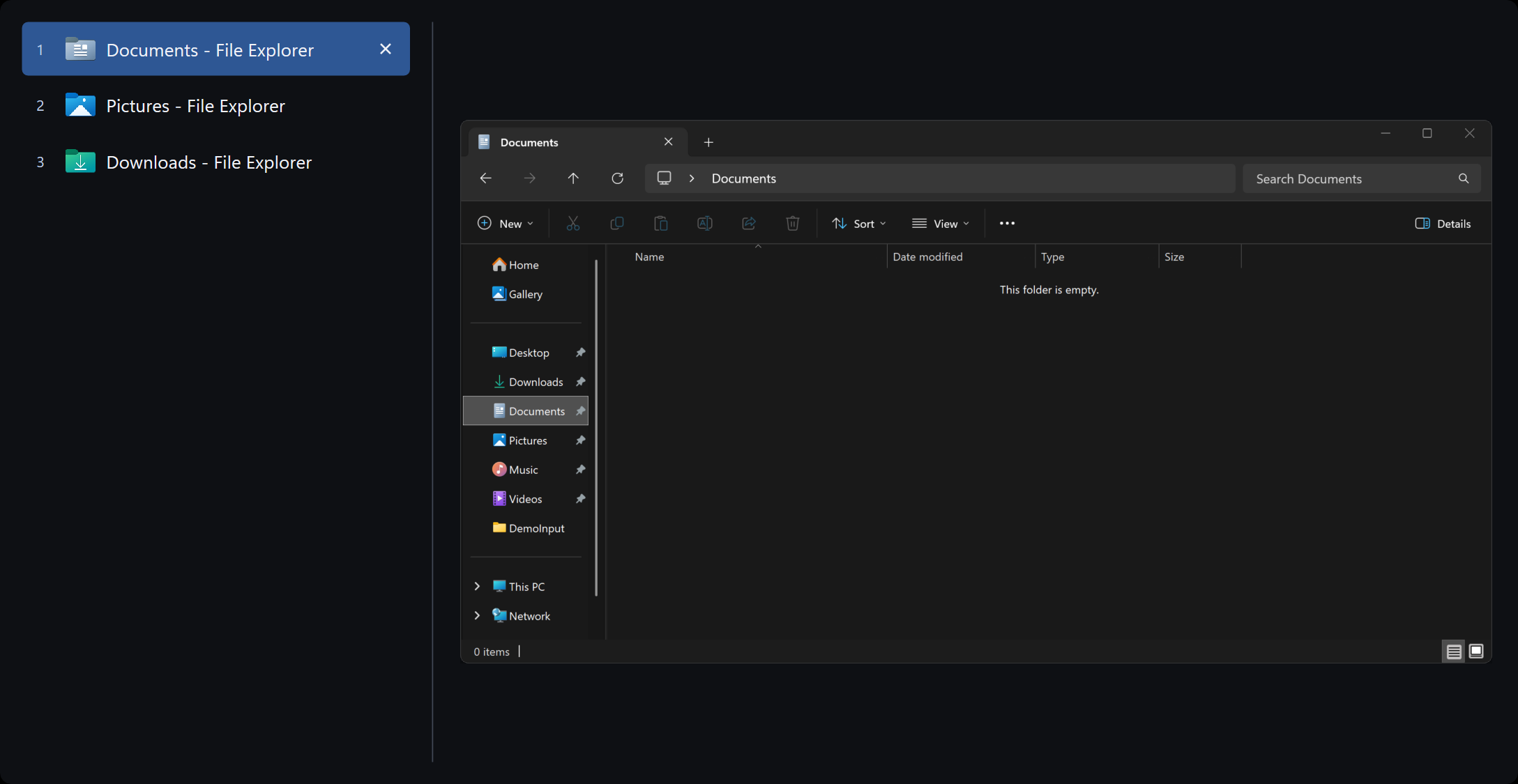
What changes when you press Alt+Tab.
-
Numbered windows
Press 1 to 9 and you're on that window, with no stepping through thumbnails.
-
Large live preview
See the selected window alone, or in its place on the full desktop.
-
Type to filter
Start typing while you hold Alt. The list narrows by title, app, or number.
-
The shortcut you know
Alt+Tab opens it and letting go of Alt switches. Win+Tab can open it too.
-
Fix a stuck window
F4 closes it, F5 to F7 minimize, maximize, and restore, and F8 ends a frozen program.
-
Works across monitors
It scales per monitor, and can list only the windows on the one you're using.
AltTabio vs. the built-in Alt+Tab
Same shortcut, same muscle memory. The difference is what you can see and do once the switcher is open.
| Feature | Windows Alt+Tab | AltTabio |
|---|---|---|
| What you see | Thumbnails of open windows | A numbered list of titles and one large live preview |
| Find a window by typing | No | By title, app name, or number |
| Jump with a number key | No | 1 to 9 |
| See the window in place on the desktop | No | Optional |
| Minimize, maximize, or restore | No | F5, F6, F7 |
| End a frozen program | Task Manager | F8, from the list |
| Switch with the right mouse button and wheel | No | Optional |
| Price | Built in | Free, MIT license |
Windows 11 can also put browser tabs in Alt+Tab. AltTabio lists windows, one row each.
Shortcuts
Alt+Tab and Enter are all you need. The rest are there when a window misbehaves.
| Alt Tab | Open the switcher and move through it. Win+Tab can open it too. |
|---|---|
| ↑ ↓ Shift Tab | Change the selected window. The mouse wheel works too. |
| Enter, click | Switch to the selected window |
| 1 to 9 | Switch to that window at once |
| Type | Filter by window title, app name, or number |
| Backspace | Remove a filter character |
| Home End | First or last window |
| Esc | Close the switcher |
| F4 | Close the selected window |
| F5 F6 F7 | Minimize, maximize, restore |
| F8 | End the selected window's program |
| F9 | Open another window of the same app, without administrator rights |
| Right click | Window commands for that row |
Settings, if you want them.
Open them from the tray icon. They are saved in AltTabio.ini next to the executable, so a copy on a USB stick keeps its setup.
- Start with Windows
- Replace Alt+Tab
- Replace Win+Tab
- Type to search
- Switch when Alt is released
- Right mouse button and wheel
- Select on mouse-over
- Live preview
- Full-desktop preview
- Only this monitor
- Compact list
- Large icons
- Number labels
- App names
- Visible borders
- Light, dark, or system theme
- Eight icon colors
Up and running in a minute.
One executable. No installer, no store account, no runtime.
Download, unzip, run
- Get the Windows zip from GitHub Releases.
- Unzip it into a folder you'll keep, such as
C:\Program Files\AltTabio. - Open
AltTabio.exe, click Yes on the Windows prompt, and press Alt+Tab.
Keep it in a safe folder
Start with Windows creates a scheduled task that runs AltTabio with the highest privileges at every logon. If a program without administrator rights could replace AltTabio.exe, it could use that task to gain them.
So move AltTabio to a folder only administrators can change, such as Program Files, before you turn the option on.
Uninstall
Turn off start with Windows if you enabled it, choose Exit from the tray icon, and delete the folder. The settings file lives in that folder, so nothing else is left.
Questions
About AltTabio on Windows. The main page covers price and privacy.
Why does Windows ask for administrator permission?
AltTabio needs it to see Alt+Tab before Windows does and to close a frozen program when you ask. Those are the only reasons.
Can I keep Win+Tab as Task View?
Yes. AltTabio replaces Alt+Tab and Win+Tab separately, so you can keep either one as Windows made it.
Does it work with several monitors and high-DPI displays?
Yes. It scales per monitor, and it can list only the windows on the monitor you are using.
How do I get the Windows Alt+Tab back?
Right-click the AltTabio icon in the system tray and choose Exit. Windows goes back to its own switcher at once.
How do I uninstall it?
Turn off start with Windows if you enabled it, exit from the tray icon, and delete the folder. The settings file lives in that folder, so nothing is left behind.
Is this an Alt+Tab Terminator alternative?
Yes. AltTabio is an independent, open-source window switcher for people who want a list and a live preview on Alt+Tab. It is not affiliated with Alt+Tab Terminator.
Try it on your next Alt+Tab.
Download, unzip, press Alt+Tab. If it isn't for you, exit from the tray and delete the folder.
Free and open source. No account, no ads, and it never goes online.